
GHL App for AgencY & SAAS ACCOUNTS
Your subaccounts are your active clients.
Now you can connect with them.
Subaccount Sync automatically pulls every subaccount owner, admin or user into your GHL CRM as contacts – so you can segment, message, automate, and manage your client base from one place.
7 Day Free Trial · Built for Agencies and SaaS
Finally connect with your subaccount owners
Running a GHL agency or SaaS means important client data lives in your Agency-level admin area, but not your CRM. Most agencies manage this with manual exports, spreadsheets, or guesswork. Frustrating and error-prone!
Now, Subaccount Sync closes that gap.
Install once, configure in minutes, and your agency CRM stays current – automatically.
Easily message or email all your subaccount owners
Trigger automations on account status changes
See all your subaccounts with plans & status
Available in the GHL App Marketplace
Subaccount Sync lets you connect with your subaccount owners more easily
SEE YOUR SUBACCOUNT OWNERS IN YOUR OWN CRM LOCATION
What gets synced
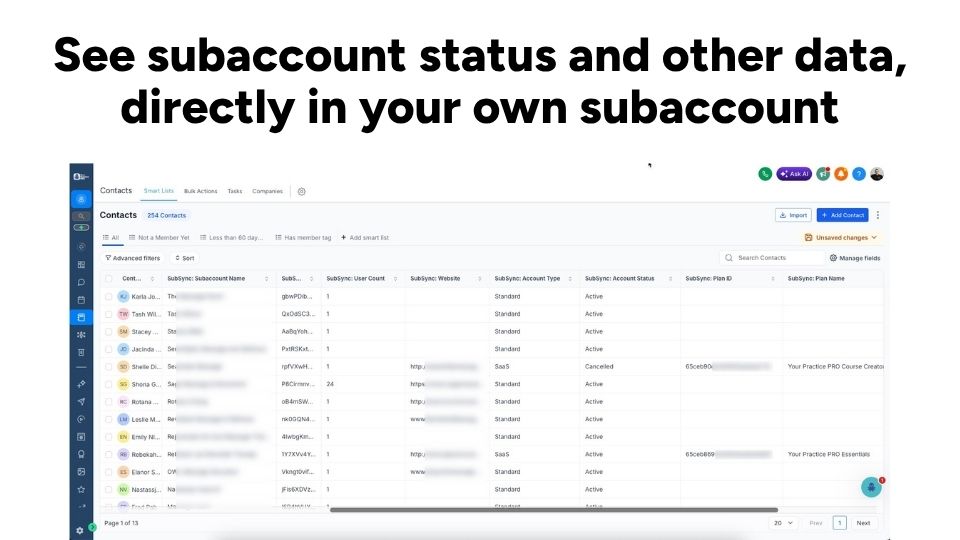
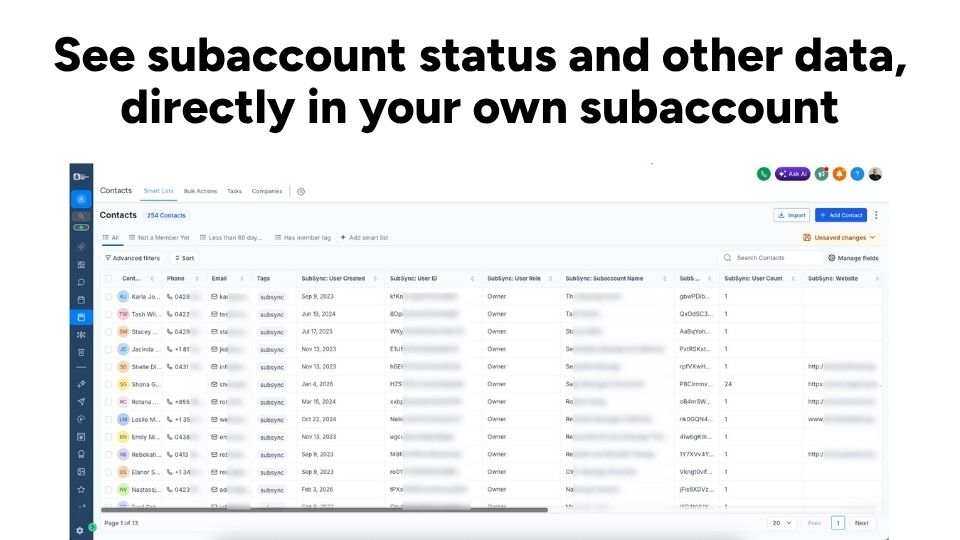
Every subaccount owner, admin or user becomes a contact in your chosen destination location, with these fields populated automatically:
Subaccount details
- Subaccount name
- Account type (SaaS or Standard)
- SaaS plan name
- Account status (Active, Trial, Past Due, Paused, Cancelled)
- Account created date
- Account age (days)
- Number of users
- Website
User details
- Name, email, phone
- User role (Owner, Admin, or User)
- User created date
All fields are created automatically in your destination location on first sync – no manual field setup required.
SIMPLE BY DESIGN
How it works
1. Install from the GHL marketplace
One click to install. Subaccount Sync connects directly to your agency account.
2. Configure in the dashboard
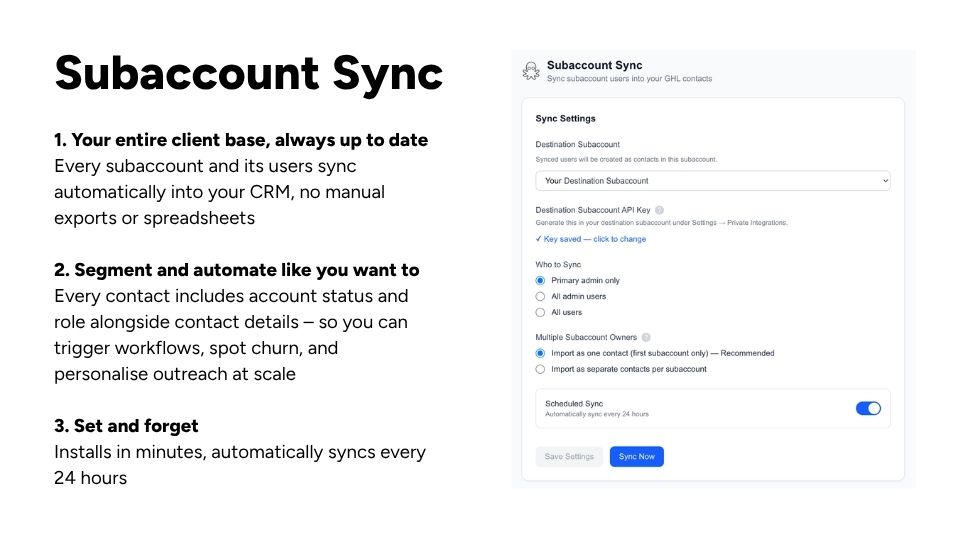
Pick your destination subaccount, choose what type of users to sync, and add your API key. Takes less than four minutes.
3. Run your first sync
Hit "Sync Now" and watch your subaccount users appear as contacts – complete with relevant subaccount data.
4. Stay up to date automatically
Enable scheduled sync and your CRM updates itself every 24 hours.
Harness the Power of GHL
Use all the power of your own GHL account to communicate with your subaccount owners: email, messages, automations, AI, and everything else.
Built for GHL natively
Installs directly from the GHL marketplace. No external accounts, no complicated setup. Authenticate, pick your destination location, and sync.
Choose which users
Choose to sync only the primary admin per subaccount, or all admins, or every user. You're in control of what lands in your CRM.
Smart deduplication
If a user belongs to multiple subaccounts, you choose what you want – either merge into one contact or creating separate records.
Scheduled + manual sync
Set it and forget it with daily automatic sync, or trigger a manual sync any time from the dashboard.
Detects deleted subaccounts
When a subaccount is removed, its contact is automatically marked as Deleted in your CRM – so your data stays accurate and you can follow up as needed.
Questions from GHL agencies
FAQ about Subaccount Sync
Free 7-Day trial
Then only $29 per month for unlimited subaccounts
Does this affect my existing contacts?
If a contact with the same email already exists in your destination location, Subaccount Sync updates that contact rather than creating a duplicate.
Which subaccount do I sync into?
You choose a destination location in the app dashboard – typically your own main agency CRM subaccount. Subaccount Sync writes all contacts there.
What happens if I uninstall?
Your previously synced contacts remain in GHL – we don't delete anything from your account. Any data of yours in our system is deleted after 30 days.
Does it work with SaaS mode?
Yes. SaaS plan name and account status are synced automatically for SaaS subaccounts.
Does it sync both ways?
No, this app brings subaccount data from your agency level into a specific subaccount of your choice, but it doesn't push back the other way. Think of it like a 1-way sync.
Simple Pricing
Free 7-Day trial
Then only $29 per month for unlimited subaccounts
Ready to improve your subaccount communication?
See exactly who's in your agency.
Install Subaccount Sync today.
Practical Apps built for Smart Businesses